

Hannah's 30th
Birthday
For those that unfortunately can't make it, we would love if you could send a video of well wishes to Hannah so I can collate them all and play on her birthday
Just something short and sweet and send by the 10th April.
Click on the link above and save the google folder. Please name your video (if you can, with your Name)


Not sure how to upload a video to
Google Drive from your Phone?
After you make your video - follow the Steps below or call me (Hannahs Mum Suzanne) on 0274762112
Android

Click on the Upload Video File button above and sign in to your Google Drive account. Or go to your Google Drive app on your phone

Find the folder Hannah's birthday video.
If you can't see it make sure you've clicked on the upload video file button above first
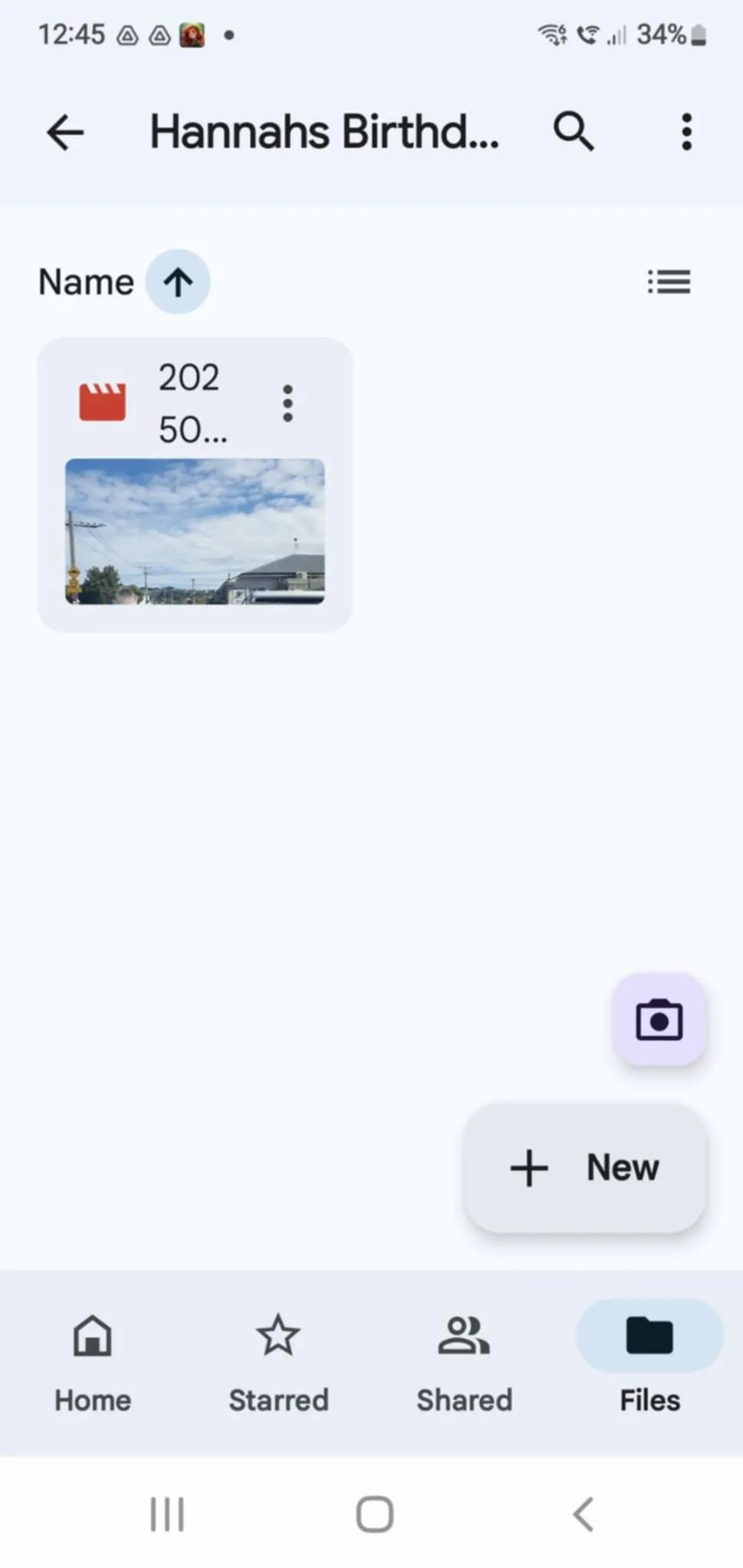
Click into Hannah's Birthday Video Folder and press +New

Press Upload

Go to your video files (at the top) and find the video you have sent. If you haven't renamed it to your name at this point, please go back and do that now. and you're done
Iphone
On iPhone/iPad:
Open the Google Drive app:
Launch the Google Drive app on your iPhone or iPad.
Find the Folder "Hannah's Birthday Video
Find the "+" icon in the bottom right corner of the screen and tap it.
Select the "Upload" option from the menu that appears.
Navigate to the folder containing the video you want to upload. If you haven't renamed it please go back and do that now.
Tap the "Upload" button to begin uploading the photo to Google Drive.